> ## Documentation Index
> Fetch the complete documentation index at: https://docs-dev-feat-docs-5613-b2b-connect.mintlify.site/llms.txt
> Use this file to discover all available pages before exploring further.

> Learn how to configure an update policy form using Forms for Actions for users to review and accept new terms of service or consent updates.

# Use Cases: Configure an update policy form using Forms

<Card title="Before you start">
  1. Create a [Machine-to-Machine Application](/docs/get-started/auth0-overview/create-applications/machine-to-machine-apps) with the following scopes enabled:

  * `read:users`
  * `update:users`
  * `create:users`
  * `read:users_app_metadata`
  * `update:users_app_metadata`
  * `create:users_app_metadata`

  2. Add a [Vault connection](/docs/customize/forms/vault) using the M2M application credentials.
</Card>

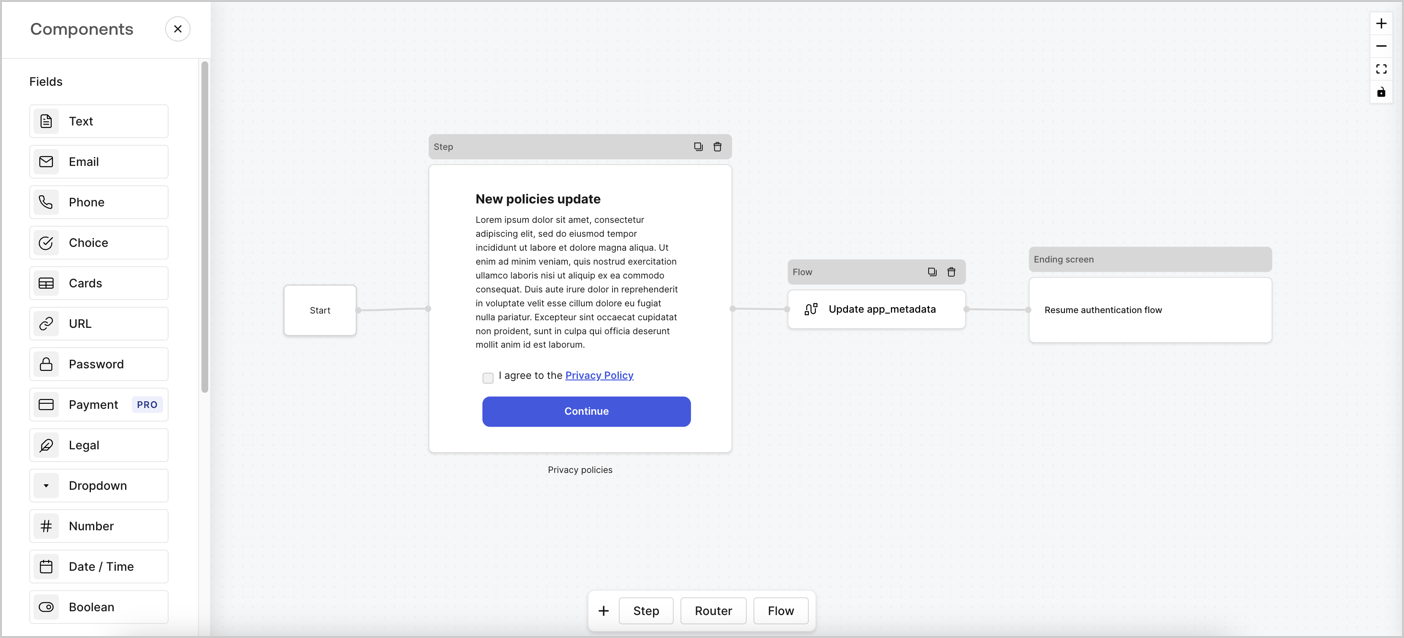
Forms for Actions allows you to create custom privacy policies flows and store the consent under the `app_metadata` object.
<Frame>
  <img src="https://mintcdn.com/docs-dev-feat-docs-5613-b2b-connect/p19MUom62LxVVYxD/docs/images/cdy7uua7fh8z/6i68dMvHDTijfRmSgN1x8Q/ad900e7d4c0fb34645921435472b8684/privavy-policy-form.png?fit=max&auto=format&n=p19MUom62LxVVYxD&q=85&s=afc9bc9b73bff39caf486accecb81248" alt="Dashboard > Actions > Forms > Privacy policy use case" data-og-width="1404" width="1404" data-og-height="638" height="638" data-path="docs/images/cdy7uua7fh8z/6i68dMvHDTijfRmSgN1x8Q/ad900e7d4c0fb34645921435472b8684/privavy-policy-form.png" data-optimize="true" data-opv="3" srcset="https://mintcdn.com/docs-dev-feat-docs-5613-b2b-connect/p19MUom62LxVVYxD/docs/images/cdy7uua7fh8z/6i68dMvHDTijfRmSgN1x8Q/ad900e7d4c0fb34645921435472b8684/privavy-policy-form.png?w=280&fit=max&auto=format&n=p19MUom62LxVVYxD&q=85&s=31160cd733f35d3bae25aaac79e3ce0f 280w, https://mintcdn.com/docs-dev-feat-docs-5613-b2b-connect/p19MUom62LxVVYxD/docs/images/cdy7uua7fh8z/6i68dMvHDTijfRmSgN1x8Q/ad900e7d4c0fb34645921435472b8684/privavy-policy-form.png?w=560&fit=max&auto=format&n=p19MUom62LxVVYxD&q=85&s=1ab7f332144de8a7c4b9f09d1d8c118f 560w, https://mintcdn.com/docs-dev-feat-docs-5613-b2b-connect/p19MUom62LxVVYxD/docs/images/cdy7uua7fh8z/6i68dMvHDTijfRmSgN1x8Q/ad900e7d4c0fb34645921435472b8684/privavy-policy-form.png?w=840&fit=max&auto=format&n=p19MUom62LxVVYxD&q=85&s=f6ba19c1d98ca87367e35eb6ea88fc5f 840w, https://mintcdn.com/docs-dev-feat-docs-5613-b2b-connect/p19MUom62LxVVYxD/docs/images/cdy7uua7fh8z/6i68dMvHDTijfRmSgN1x8Q/ad900e7d4c0fb34645921435472b8684/privavy-policy-form.png?w=1100&fit=max&auto=format&n=p19MUom62LxVVYxD&q=85&s=ebb6f1459c6df90c71344a3a52721127 1100w, https://mintcdn.com/docs-dev-feat-docs-5613-b2b-connect/p19MUom62LxVVYxD/docs/images/cdy7uua7fh8z/6i68dMvHDTijfRmSgN1x8Q/ad900e7d4c0fb34645921435472b8684/privavy-policy-form.png?w=1650&fit=max&auto=format&n=p19MUom62LxVVYxD&q=85&s=cf00ad2cae198b5855570ee040424e7f 1650w, https://mintcdn.com/docs-dev-feat-docs-5613-b2b-connect/p19MUom62LxVVYxD/docs/images/cdy7uua7fh8z/6i68dMvHDTijfRmSgN1x8Q/ad900e7d4c0fb34645921435472b8684/privavy-policy-form.png?w=2500&fit=max&auto=format&n=p19MUom62LxVVYxD&q=85&s=0d281bb1918fb0e188098e63f61f5b5b 2500w" />
</Frame>

The sections below outline how you can create an Update Policy form using nodes and flows, along with steps for adding your form to a [Post Login](/docs/customize/actions/explore-triggers/signup-and-login-triggers/login-trigger) Action.

## Create a form from scratch

Follow these steps to create a form to gather information:

1. Open the Form editor by selecting **Auth0 Dashboard > Actions > Forms.**
2. Select **Create Form** > **Start from scratch**.

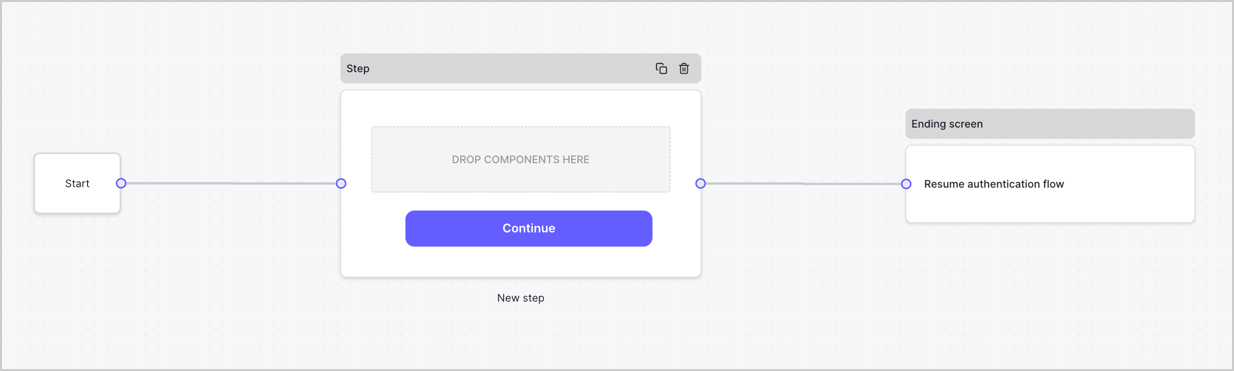
By default, a new form contains a Start node, a Step node, and an Ending screen node.
<Frame>
  <img src="https://mintcdn.com/docs-dev-feat-docs-5613-b2b-connect/--y3cGPRzfZeRD0C/docs/images/cdy7uua7fh8z/2TZ9jSjgEcARFpULI6hz4R/a4319a1bd482f2ee5cc23100fdb2f42c/New-form-Forms-for-action-use-case.png?fit=max&auto=format&n=--y3cGPRzfZeRD0C&q=85&s=a5f582cbd8937ca14b362cd458e533d0" alt="Dashboard > Forms > Use Cases > Form" data-og-width="1234" width="1234" data-og-height="371" height="371" data-path="docs/images/cdy7uua7fh8z/2TZ9jSjgEcARFpULI6hz4R/a4319a1bd482f2ee5cc23100fdb2f42c/New-form-Forms-for-action-use-case.png" data-optimize="true" data-opv="3" srcset="https://mintcdn.com/docs-dev-feat-docs-5613-b2b-connect/--y3cGPRzfZeRD0C/docs/images/cdy7uua7fh8z/2TZ9jSjgEcARFpULI6hz4R/a4319a1bd482f2ee5cc23100fdb2f42c/New-form-Forms-for-action-use-case.png?w=280&fit=max&auto=format&n=--y3cGPRzfZeRD0C&q=85&s=546c21f8c95cb2dfa5667a3b2b66350f 280w, https://mintcdn.com/docs-dev-feat-docs-5613-b2b-connect/--y3cGPRzfZeRD0C/docs/images/cdy7uua7fh8z/2TZ9jSjgEcARFpULI6hz4R/a4319a1bd482f2ee5cc23100fdb2f42c/New-form-Forms-for-action-use-case.png?w=560&fit=max&auto=format&n=--y3cGPRzfZeRD0C&q=85&s=f6dbdf7a38f9c852d744d1f70132d4c2 560w, https://mintcdn.com/docs-dev-feat-docs-5613-b2b-connect/--y3cGPRzfZeRD0C/docs/images/cdy7uua7fh8z/2TZ9jSjgEcARFpULI6hz4R/a4319a1bd482f2ee5cc23100fdb2f42c/New-form-Forms-for-action-use-case.png?w=840&fit=max&auto=format&n=--y3cGPRzfZeRD0C&q=85&s=6c701d95d046e253d7d67b4c9c1dea05 840w, https://mintcdn.com/docs-dev-feat-docs-5613-b2b-connect/--y3cGPRzfZeRD0C/docs/images/cdy7uua7fh8z/2TZ9jSjgEcARFpULI6hz4R/a4319a1bd482f2ee5cc23100fdb2f42c/New-form-Forms-for-action-use-case.png?w=1100&fit=max&auto=format&n=--y3cGPRzfZeRD0C&q=85&s=8fb92d0f25624cffd2d4455ed959864b 1100w, https://mintcdn.com/docs-dev-feat-docs-5613-b2b-connect/--y3cGPRzfZeRD0C/docs/images/cdy7uua7fh8z/2TZ9jSjgEcARFpULI6hz4R/a4319a1bd482f2ee5cc23100fdb2f42c/New-form-Forms-for-action-use-case.png?w=1650&fit=max&auto=format&n=--y3cGPRzfZeRD0C&q=85&s=fde9dcb0ac38f63dfd18bf3d9d0ab146 1650w, https://mintcdn.com/docs-dev-feat-docs-5613-b2b-connect/--y3cGPRzfZeRD0C/docs/images/cdy7uua7fh8z/2TZ9jSjgEcARFpULI6hz4R/a4319a1bd482f2ee5cc23100fdb2f42c/New-form-Forms-for-action-use-case.png?w=2500&fit=max&auto=format&n=--y3cGPRzfZeRD0C&q=85&s=4bcfce28cc1c9a51a1b28ffaed4e894a 2500w" />
</Frame>

### Configure the Step node

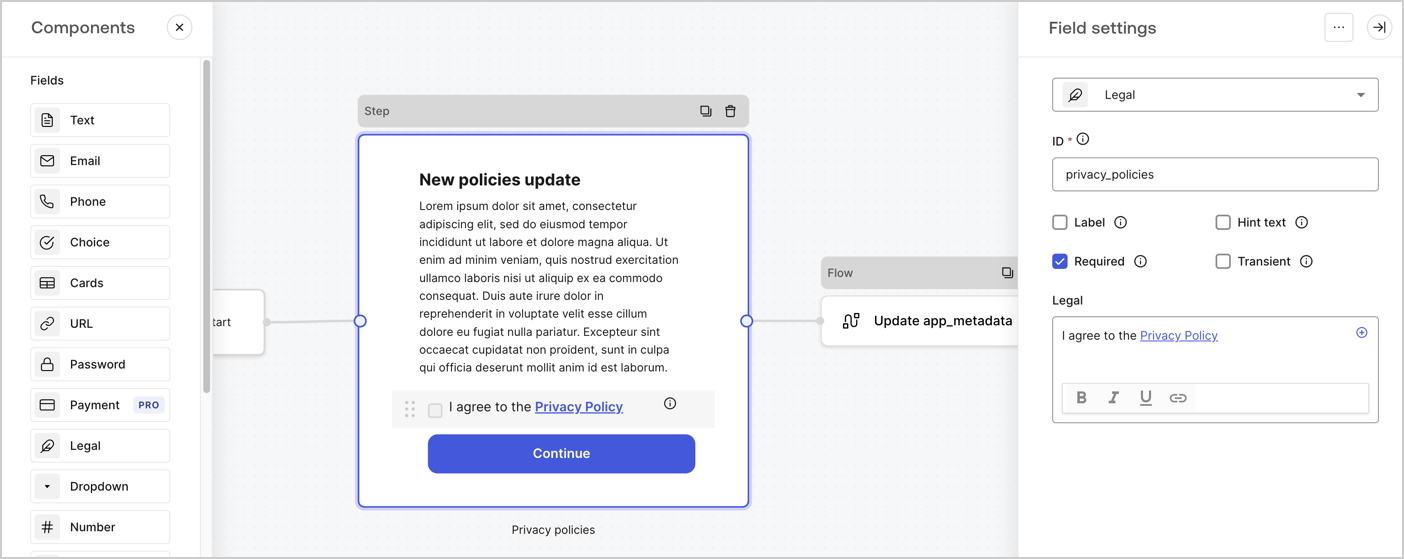
The Step node is the graphical interface visible to users. Add [Fields](/docs/customize/forms/nodes-and-components) to the Step node to collect the new agreement acceptance value by following these steps:

1. Drag a **Rich text** field from the **Components menu** into the **Step** node.

   * **Rich text**: Enter a description of your privacy policies updates.
   * Select **Save**.
2. Drag a **Legal** field into the **Step** node.

   * **ID**: Enter `privacy_policies`.
   * **Required**: Enable the checkbox.
   * **Legal**: Enter `I agree to the Privacy Policy`.
   * Select **Save**.
3. Select **Publish** to save.
<Frame>
  <img src="https://mintcdn.com/docs-dev-feat-docs-5613-b2b-connect/dKl-L2G3B6Ap__pi/docs/images/cdy7uua7fh8z/59zFFjQjAnjogkc2QGIqqJ/0ad66b1b636544122aa4e65968b76c2c/privacy-policy-step-node.png?fit=max&auto=format&n=dKl-L2G3B6Ap__pi&q=85&s=1e47bfdb06ac33199d35885360facee1" alt="Dashboard > Actions > Forms > Use case privacy policy step node" data-og-width="1404" width="1404" data-og-height="559" height="559" data-path="docs/images/cdy7uua7fh8z/59zFFjQjAnjogkc2QGIqqJ/0ad66b1b636544122aa4e65968b76c2c/privacy-policy-step-node.png" data-optimize="true" data-opv="3" srcset="https://mintcdn.com/docs-dev-feat-docs-5613-b2b-connect/dKl-L2G3B6Ap__pi/docs/images/cdy7uua7fh8z/59zFFjQjAnjogkc2QGIqqJ/0ad66b1b636544122aa4e65968b76c2c/privacy-policy-step-node.png?w=280&fit=max&auto=format&n=dKl-L2G3B6Ap__pi&q=85&s=da4e72f750e0b0eebc5bb09cffdd5e19 280w, https://mintcdn.com/docs-dev-feat-docs-5613-b2b-connect/dKl-L2G3B6Ap__pi/docs/images/cdy7uua7fh8z/59zFFjQjAnjogkc2QGIqqJ/0ad66b1b636544122aa4e65968b76c2c/privacy-policy-step-node.png?w=560&fit=max&auto=format&n=dKl-L2G3B6Ap__pi&q=85&s=ccfb19d635b8c3efad90a1c036f06bf1 560w, https://mintcdn.com/docs-dev-feat-docs-5613-b2b-connect/dKl-L2G3B6Ap__pi/docs/images/cdy7uua7fh8z/59zFFjQjAnjogkc2QGIqqJ/0ad66b1b636544122aa4e65968b76c2c/privacy-policy-step-node.png?w=840&fit=max&auto=format&n=dKl-L2G3B6Ap__pi&q=85&s=18068514bfc62e5553d666b3b5d5b3ae 840w, https://mintcdn.com/docs-dev-feat-docs-5613-b2b-connect/dKl-L2G3B6Ap__pi/docs/images/cdy7uua7fh8z/59zFFjQjAnjogkc2QGIqqJ/0ad66b1b636544122aa4e65968b76c2c/privacy-policy-step-node.png?w=1100&fit=max&auto=format&n=dKl-L2G3B6Ap__pi&q=85&s=757da6c0508dc9529063a398afc95b32 1100w, https://mintcdn.com/docs-dev-feat-docs-5613-b2b-connect/dKl-L2G3B6Ap__pi/docs/images/cdy7uua7fh8z/59zFFjQjAnjogkc2QGIqqJ/0ad66b1b636544122aa4e65968b76c2c/privacy-policy-step-node.png?w=1650&fit=max&auto=format&n=dKl-L2G3B6Ap__pi&q=85&s=72988b8bb9dedcdd5f7a05daea67b37c 1650w, https://mintcdn.com/docs-dev-feat-docs-5613-b2b-connect/dKl-L2G3B6Ap__pi/docs/images/cdy7uua7fh8z/59zFFjQjAnjogkc2QGIqqJ/0ad66b1b636544122aa4e65968b76c2c/privacy-policy-step-node.png?w=2500&fit=max&auto=format&n=dKl-L2G3B6Ap__pi&q=85&s=3c146991d442cd99db7481998ab95b4e 2500w" />
</Frame>

### Configure the Flow node

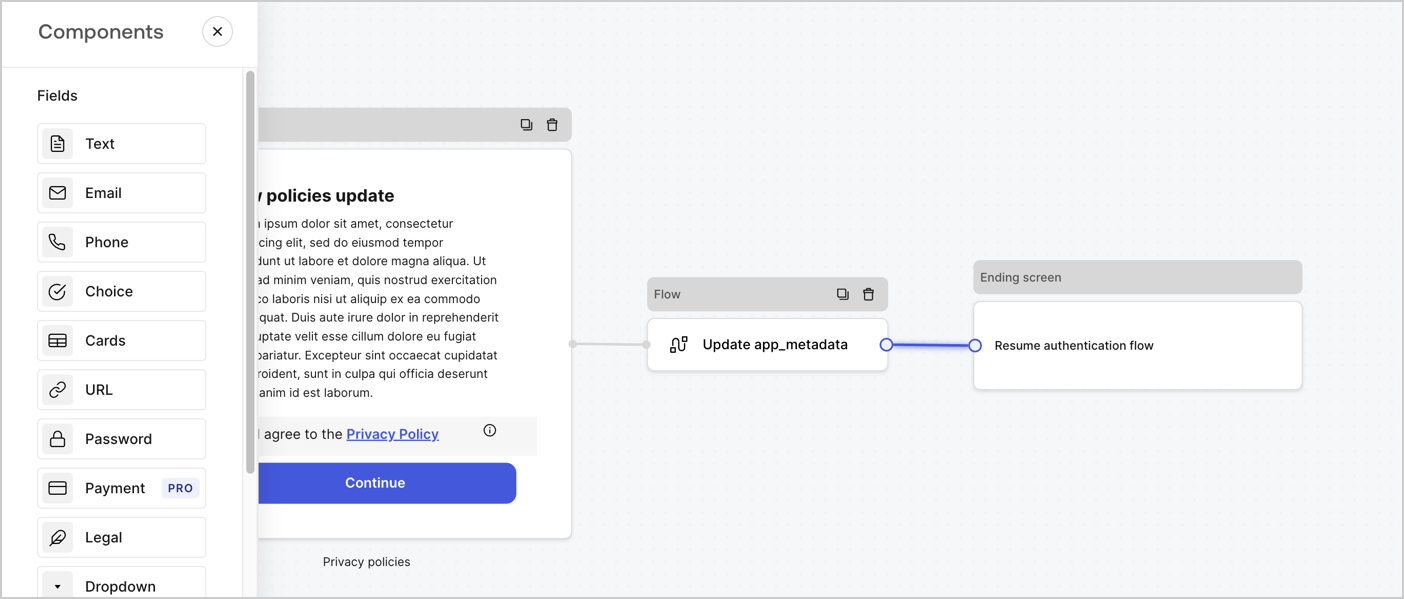
Add a **Flow** node after the **Step** node to update the `app_metadata` and resume the authentication flow by following these steps:

1. Select **Flow** from the bottom of the Form editor.
2. Remove the existing link between the **Step** and **Ending Screen** nodes.
3. Select the new **Flow** > **Click to add a flow** > **Create a new flow.**

   * Enter `Update app_metadata` in the **Name** field.
   * Select **Create**.
   * Select **Save**.
4. Link the **Flow** node to the **Step** and **Ending Screen** nodes as pictured below.
5. Select **Publish** to save.
<Frame>
  <img src="https://mintcdn.com/docs-dev-feat-docs-5613-b2b-connect/p19MUom62LxVVYxD/docs/images/cdy7uua7fh8z/6YIkzm7SrpM9LW76AXuRzh/353c518fe82bbaa440836da1d83596d6/link-policies.png?fit=max&auto=format&n=p19MUom62LxVVYxD&q=85&s=eb7c15b2e391411e9322cd74622c0697" alt="Dashboard > Actions > Forms > Form" data-og-width="1404" width="1404" data-og-height="599" height="599" data-path="docs/images/cdy7uua7fh8z/6YIkzm7SrpM9LW76AXuRzh/353c518fe82bbaa440836da1d83596d6/link-policies.png" data-optimize="true" data-opv="3" srcset="https://mintcdn.com/docs-dev-feat-docs-5613-b2b-connect/p19MUom62LxVVYxD/docs/images/cdy7uua7fh8z/6YIkzm7SrpM9LW76AXuRzh/353c518fe82bbaa440836da1d83596d6/link-policies.png?w=280&fit=max&auto=format&n=p19MUom62LxVVYxD&q=85&s=6afe0e585cbc294f58ece8085ed5b6a4 280w, https://mintcdn.com/docs-dev-feat-docs-5613-b2b-connect/p19MUom62LxVVYxD/docs/images/cdy7uua7fh8z/6YIkzm7SrpM9LW76AXuRzh/353c518fe82bbaa440836da1d83596d6/link-policies.png?w=560&fit=max&auto=format&n=p19MUom62LxVVYxD&q=85&s=6d326cb2f324b0b3766c14ebd80fdbe8 560w, https://mintcdn.com/docs-dev-feat-docs-5613-b2b-connect/p19MUom62LxVVYxD/docs/images/cdy7uua7fh8z/6YIkzm7SrpM9LW76AXuRzh/353c518fe82bbaa440836da1d83596d6/link-policies.png?w=840&fit=max&auto=format&n=p19MUom62LxVVYxD&q=85&s=519752364cb68364a4224cc66a422f33 840w, https://mintcdn.com/docs-dev-feat-docs-5613-b2b-connect/p19MUom62LxVVYxD/docs/images/cdy7uua7fh8z/6YIkzm7SrpM9LW76AXuRzh/353c518fe82bbaa440836da1d83596d6/link-policies.png?w=1100&fit=max&auto=format&n=p19MUom62LxVVYxD&q=85&s=4e075895afece0ee27819cad9460718f 1100w, https://mintcdn.com/docs-dev-feat-docs-5613-b2b-connect/p19MUom62LxVVYxD/docs/images/cdy7uua7fh8z/6YIkzm7SrpM9LW76AXuRzh/353c518fe82bbaa440836da1d83596d6/link-policies.png?w=1650&fit=max&auto=format&n=p19MUom62LxVVYxD&q=85&s=26cd20f5a398545b4bc4837ba1984f52 1650w, https://mintcdn.com/docs-dev-feat-docs-5613-b2b-connect/p19MUom62LxVVYxD/docs/images/cdy7uua7fh8z/6YIkzm7SrpM9LW76AXuRzh/353c518fe82bbaa440836da1d83596d6/link-policies.png?w=2500&fit=max&auto=format&n=p19MUom62LxVVYxD&q=85&s=b8bcf5bcfd07ccc6122bed26aea76a64 2500w" />
</Frame>

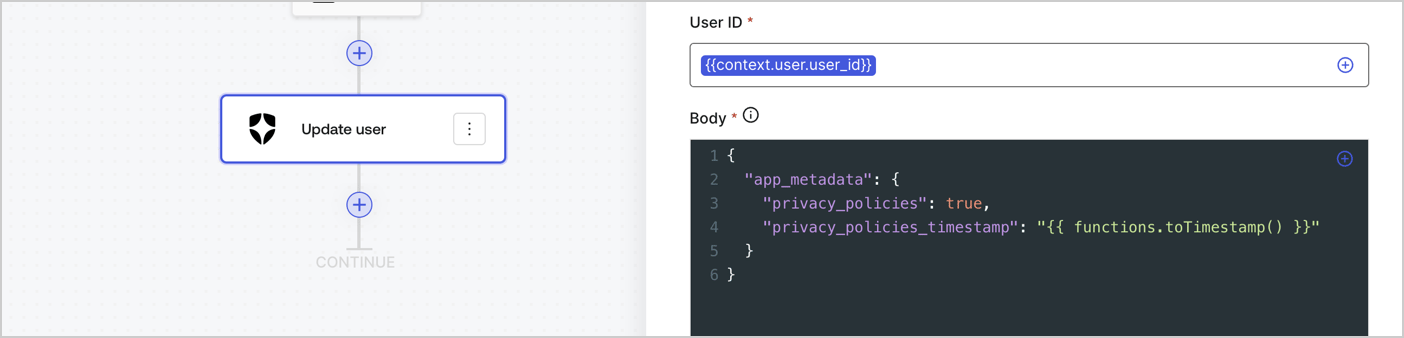
Add an Auth0 Update user action to the flow by following these steps:

1. Select the **Flow** **Update app\_metadata** > **Edit flow** to open the Flow editor in a new tab.
2. Below the StartAction, select the **+** icon to add an **Update user** action. Complete the fields below, then select **Save** to continue.

   * **Connection**: Select from the dropdown the Vault connection to your M2M application.

   * **User ID**: Enter `{{context.user.user_id}}`.

   * **Body**: Copy and paste the following code to update the app\_metadata with the privacy\_policies and privacy\_policies\_timestamp properties.

     ```text lines theme={null}
     {
       "app_metadata": {
         "privacy_policies": true,
         "privacy_policies_timestamp": "{{ functions.toTimestamp() }}"
       }
     }
     ```

   * Select **Save**.
3. Select **Publish** to save.
<Frame>
  <img src="https://mintcdn.com/docs-dev-feat-docs-5613-b2b-connect/aHqNfljWKM0Uor4S/docs/images/cdy7uua7fh8z/CvMNIwWrOUwaFW4X3G28p/1fb70ae57a20749d9ffaaba8dc0b7e26/update-user-privacy.png?fit=max&auto=format&n=aHqNfljWKM0Uor4S&q=85&s=c358226e7fe3c758008b6df1084caecb" alt="Dashboard > Actions > Forms > User case privacy policy code" data-og-width="1404" width="1404" data-og-height="338" height="338" data-path="docs/images/cdy7uua7fh8z/CvMNIwWrOUwaFW4X3G28p/1fb70ae57a20749d9ffaaba8dc0b7e26/update-user-privacy.png" data-optimize="true" data-opv="3" srcset="https://mintcdn.com/docs-dev-feat-docs-5613-b2b-connect/aHqNfljWKM0Uor4S/docs/images/cdy7uua7fh8z/CvMNIwWrOUwaFW4X3G28p/1fb70ae57a20749d9ffaaba8dc0b7e26/update-user-privacy.png?w=280&fit=max&auto=format&n=aHqNfljWKM0Uor4S&q=85&s=80079da79d6fda0f23afb8c17a344994 280w, https://mintcdn.com/docs-dev-feat-docs-5613-b2b-connect/aHqNfljWKM0Uor4S/docs/images/cdy7uua7fh8z/CvMNIwWrOUwaFW4X3G28p/1fb70ae57a20749d9ffaaba8dc0b7e26/update-user-privacy.png?w=560&fit=max&auto=format&n=aHqNfljWKM0Uor4S&q=85&s=204c120ae7cd5f0ec08416b22cbb03ed 560w, https://mintcdn.com/docs-dev-feat-docs-5613-b2b-connect/aHqNfljWKM0Uor4S/docs/images/cdy7uua7fh8z/CvMNIwWrOUwaFW4X3G28p/1fb70ae57a20749d9ffaaba8dc0b7e26/update-user-privacy.png?w=840&fit=max&auto=format&n=aHqNfljWKM0Uor4S&q=85&s=2265d3732e7250ad2574aba93192b712 840w, https://mintcdn.com/docs-dev-feat-docs-5613-b2b-connect/aHqNfljWKM0Uor4S/docs/images/cdy7uua7fh8z/CvMNIwWrOUwaFW4X3G28p/1fb70ae57a20749d9ffaaba8dc0b7e26/update-user-privacy.png?w=1100&fit=max&auto=format&n=aHqNfljWKM0Uor4S&q=85&s=a2bcda9ecb9a1bf0af76e3838ea7f3ac 1100w, https://mintcdn.com/docs-dev-feat-docs-5613-b2b-connect/aHqNfljWKM0Uor4S/docs/images/cdy7uua7fh8z/CvMNIwWrOUwaFW4X3G28p/1fb70ae57a20749d9ffaaba8dc0b7e26/update-user-privacy.png?w=1650&fit=max&auto=format&n=aHqNfljWKM0Uor4S&q=85&s=8574f87a3756816ca40f612d688aa21a 1650w, https://mintcdn.com/docs-dev-feat-docs-5613-b2b-connect/aHqNfljWKM0Uor4S/docs/images/cdy7uua7fh8z/CvMNIwWrOUwaFW4X3G28p/1fb70ae57a20749d9ffaaba8dc0b7e26/update-user-privacy.png?w=2500&fit=max&auto=format&n=aHqNfljWKM0Uor4S&q=85&s=598c5e78d92b7956b41da76699350d5b 2500w" />
</Frame>

<Callout icon="file-lines" color="#0EA5E9" iconType="regular">
  The flow **Update app\_metadata** adds a `privacy_policies true` value to the app`_metadata` object and also generates a timestamp with a [helper function.](/docs/customize/forms/variables)
</Callout>

## Retrieve the form render code

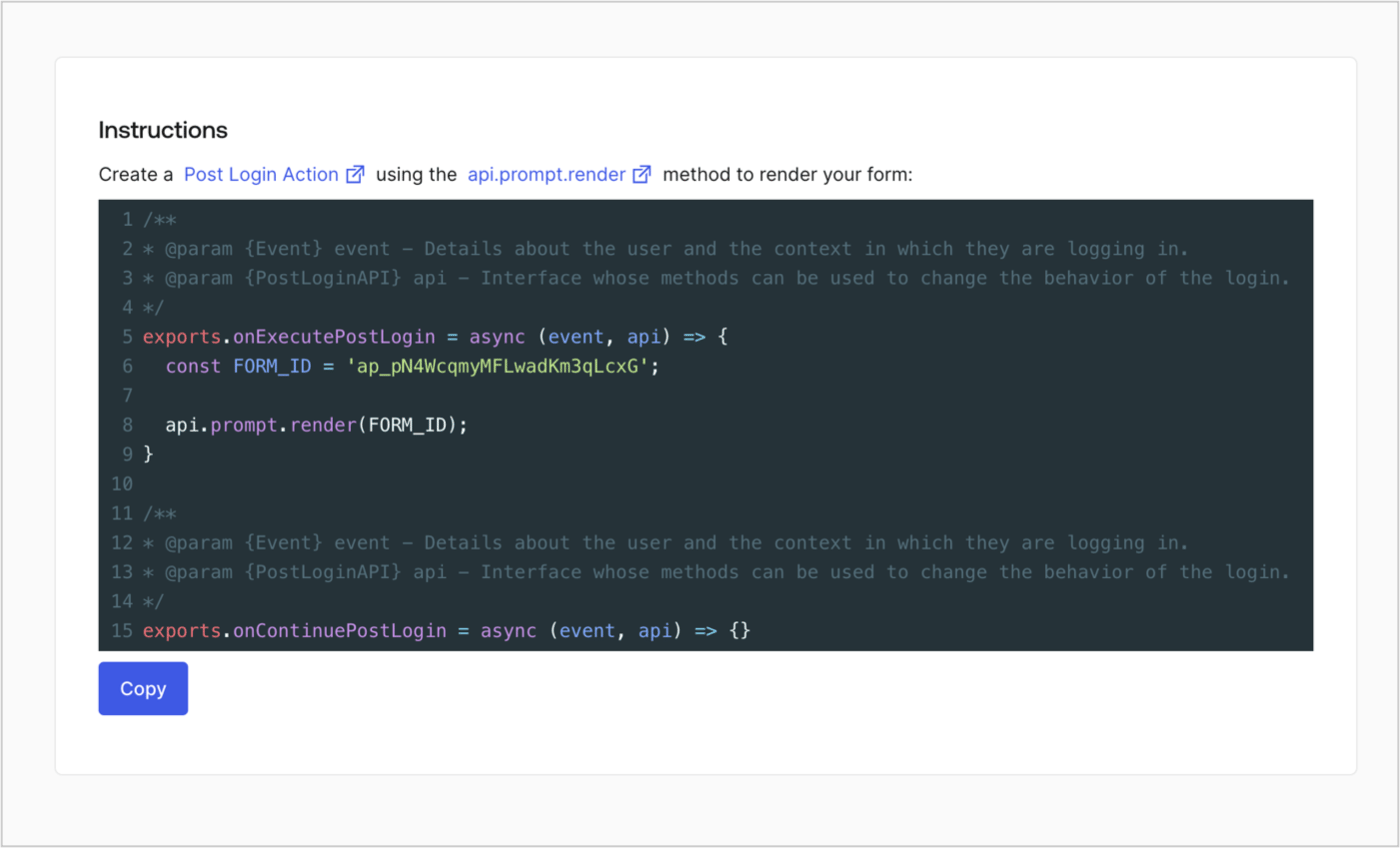
Retrieve your form render code to visually render the form with a custom Post Login Action by following these steps:

* From the Form editor, select **`<> Render`**.
* Select **Copy**.
<Frame>
  <img src="https://mintcdn.com/docs-dev-feat-docs-5613-b2b-connect/23Djz5x7G4Jv3-im/docs/images/cdy7uua7fh8z/2EIUzc539sq9lwoTKbjoJv/496a864c0fc44a782c9cadca119dbfb0/embed.png?fit=max&auto=format&n=23Djz5x7G4Jv3-im&q=85&s=3568c5536685685f0600c98696437106" alt="Dashboard > Actions > Forms > Form > Embed" data-og-width="1400" width="1400" data-og-height="848" height="848" data-path="docs/images/cdy7uua7fh8z/2EIUzc539sq9lwoTKbjoJv/496a864c0fc44a782c9cadca119dbfb0/embed.png" data-optimize="true" data-opv="3" srcset="https://mintcdn.com/docs-dev-feat-docs-5613-b2b-connect/23Djz5x7G4Jv3-im/docs/images/cdy7uua7fh8z/2EIUzc539sq9lwoTKbjoJv/496a864c0fc44a782c9cadca119dbfb0/embed.png?w=280&fit=max&auto=format&n=23Djz5x7G4Jv3-im&q=85&s=ba936ff195b2eb1b3d5eed57c2561622 280w, https://mintcdn.com/docs-dev-feat-docs-5613-b2b-connect/23Djz5x7G4Jv3-im/docs/images/cdy7uua7fh8z/2EIUzc539sq9lwoTKbjoJv/496a864c0fc44a782c9cadca119dbfb0/embed.png?w=560&fit=max&auto=format&n=23Djz5x7G4Jv3-im&q=85&s=7ea9147a487d27b075e57224e9a34a1c 560w, https://mintcdn.com/docs-dev-feat-docs-5613-b2b-connect/23Djz5x7G4Jv3-im/docs/images/cdy7uua7fh8z/2EIUzc539sq9lwoTKbjoJv/496a864c0fc44a782c9cadca119dbfb0/embed.png?w=840&fit=max&auto=format&n=23Djz5x7G4Jv3-im&q=85&s=b9765bfe594152a64537798ccb42ec9c 840w, https://mintcdn.com/docs-dev-feat-docs-5613-b2b-connect/23Djz5x7G4Jv3-im/docs/images/cdy7uua7fh8z/2EIUzc539sq9lwoTKbjoJv/496a864c0fc44a782c9cadca119dbfb0/embed.png?w=1100&fit=max&auto=format&n=23Djz5x7G4Jv3-im&q=85&s=8b5e4c3e8b690c4952bdf857b4cf28f1 1100w, https://mintcdn.com/docs-dev-feat-docs-5613-b2b-connect/23Djz5x7G4Jv3-im/docs/images/cdy7uua7fh8z/2EIUzc539sq9lwoTKbjoJv/496a864c0fc44a782c9cadca119dbfb0/embed.png?w=1650&fit=max&auto=format&n=23Djz5x7G4Jv3-im&q=85&s=d7902517cc7d2cca5f23c2b7f7d8704d 1650w, https://mintcdn.com/docs-dev-feat-docs-5613-b2b-connect/23Djz5x7G4Jv3-im/docs/images/cdy7uua7fh8z/2EIUzc539sq9lwoTKbjoJv/496a864c0fc44a782c9cadca119dbfb0/embed.png?w=2500&fit=max&auto=format&n=23Djz5x7G4Jv3-im&q=85&s=3d78e32613504b2a29d9ae25e9af3ad0 2500w" />
</Frame>

## Create a Post Login Action

Create a post-login Action to render your form by following these steps:

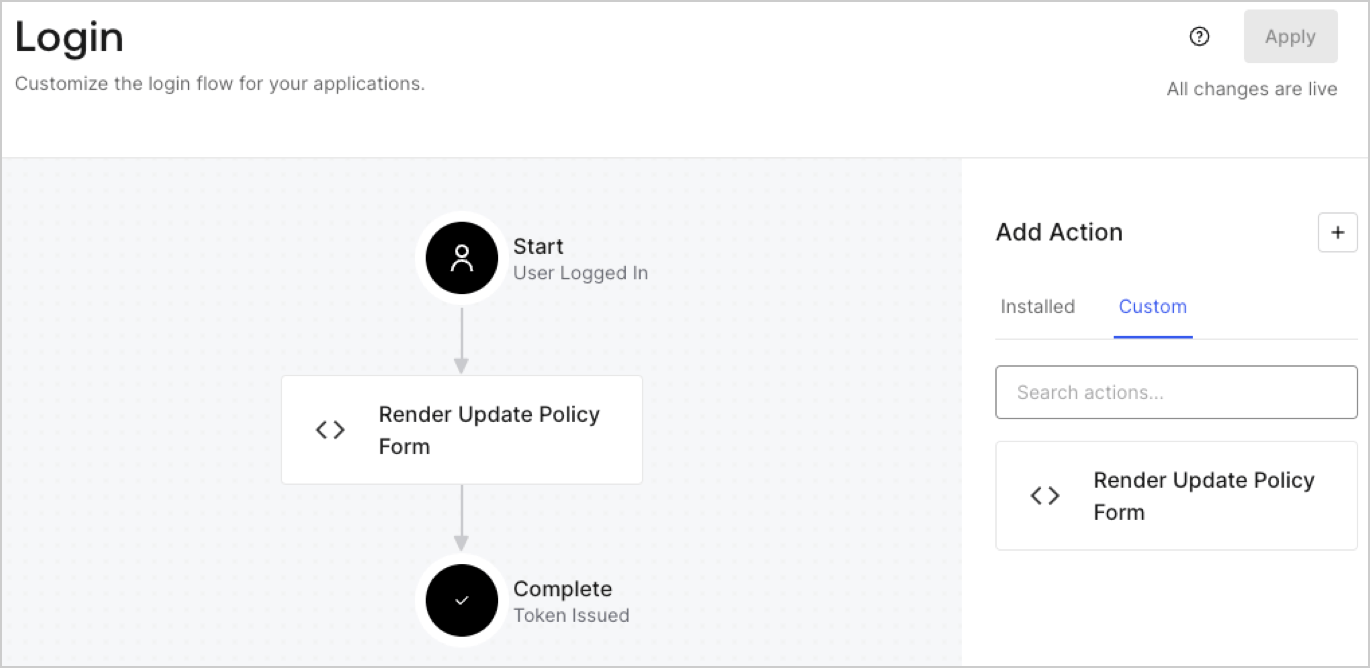
1. Navigate to **Auth0 Dashboard > Actions > Flows > Login.**
2. Select the **+** icon and Select **Build from scratch**:

   * **Name**: Enter `Render Update Policy Form`.
   * **Trigger**: Select `Login / Post Login`.
   * **Runtime**: Select the recommended version.
3. Select **Create**.

To configure the post-login Action:

1. Delete the existing code from the Code editor.
2. Paste the form render code into the Code editor.
3. Edit the code to define the conditional logic that will render the form.

   ```javascript lines theme={null}
   /**
   * @param {Event} event - Details about the user and the context in which they are logging in.
   * @param {PostLoginAPI} api - Interface whose methods can be used to change the behavior of the login.
   */
   exports.onExecutePostLogin = async (event, api) => {
     const FORM_ID = 'REPLACE_WITH_YOUR_FORM_ID';

     if (event.user.app_metadata.privacy_policies !== true) {
       api.prompt.render(FORM_ID);
     }
   }

   exports.onContinuePostLogin = async (event, api) => { }
   ```

   <Callout icon="file-lines" color="#0EA5E9" iconType="regular">
     The example code above will render the form when a user is missing the app metadata `privacy_policies` property.
   </Callout>
4. Select **Deploy.**
5. Drag and Drop the **Render Update Policy Form** Action to the **Login** flow.
   <Frame>
     <img src="https://mintcdn.com/docs-dev-feat-docs-5613-b2b-connect/I48f7cXpCwdPD3_M/docs/images/cdy7uua7fh8z/5TOwDgevZsBqd7yZynUYWU/41ca909dc3007aed4f40ff794a05efa5/postlogin.png?fit=max&auto=format&n=I48f7cXpCwdPD3_M&q=85&s=c585d93fba28fdb59dec50d298c63d55" alt="Dashboard > Forms > Use Case > Render update policy form login action" data-og-width="1370" width="1370" data-og-height="668" height="668" data-path="docs/images/cdy7uua7fh8z/5TOwDgevZsBqd7yZynUYWU/41ca909dc3007aed4f40ff794a05efa5/postlogin.png" data-optimize="true" data-opv="3" srcset="https://mintcdn.com/docs-dev-feat-docs-5613-b2b-connect/I48f7cXpCwdPD3_M/docs/images/cdy7uua7fh8z/5TOwDgevZsBqd7yZynUYWU/41ca909dc3007aed4f40ff794a05efa5/postlogin.png?w=280&fit=max&auto=format&n=I48f7cXpCwdPD3_M&q=85&s=3713256624ef6d27d62add8b4c4b4278 280w, https://mintcdn.com/docs-dev-feat-docs-5613-b2b-connect/I48f7cXpCwdPD3_M/docs/images/cdy7uua7fh8z/5TOwDgevZsBqd7yZynUYWU/41ca909dc3007aed4f40ff794a05efa5/postlogin.png?w=560&fit=max&auto=format&n=I48f7cXpCwdPD3_M&q=85&s=89e8c716c2a94c5a5e6a8d33288aadc3 560w, https://mintcdn.com/docs-dev-feat-docs-5613-b2b-connect/I48f7cXpCwdPD3_M/docs/images/cdy7uua7fh8z/5TOwDgevZsBqd7yZynUYWU/41ca909dc3007aed4f40ff794a05efa5/postlogin.png?w=840&fit=max&auto=format&n=I48f7cXpCwdPD3_M&q=85&s=f8430be519250c88fc6a178c12002e7c 840w, https://mintcdn.com/docs-dev-feat-docs-5613-b2b-connect/I48f7cXpCwdPD3_M/docs/images/cdy7uua7fh8z/5TOwDgevZsBqd7yZynUYWU/41ca909dc3007aed4f40ff794a05efa5/postlogin.png?w=1100&fit=max&auto=format&n=I48f7cXpCwdPD3_M&q=85&s=cb202257073fae2a35229a521435adb8 1100w, https://mintcdn.com/docs-dev-feat-docs-5613-b2b-connect/I48f7cXpCwdPD3_M/docs/images/cdy7uua7fh8z/5TOwDgevZsBqd7yZynUYWU/41ca909dc3007aed4f40ff794a05efa5/postlogin.png?w=1650&fit=max&auto=format&n=I48f7cXpCwdPD3_M&q=85&s=99c25ca3f46613a38d41f5e8ed9d13ee 1650w, https://mintcdn.com/docs-dev-feat-docs-5613-b2b-connect/I48f7cXpCwdPD3_M/docs/images/cdy7uua7fh8z/5TOwDgevZsBqd7yZynUYWU/41ca909dc3007aed4f40ff794a05efa5/postlogin.png?w=2500&fit=max&auto=format&n=I48f7cXpCwdPD3_M&q=85&s=3529a5c08f5f1ba27a76483ac1985d94 2500w" />
   </Frame>
6. Select **Apply.**

### Test implementation

Test the implementation by following these steps:

1. Log in with an existing user whose app`_metadata` attribute `privacy_policies` does not have a value.
2. The post-login Action in the Login flow will render the form and prompt for acceptance.
3. Select **Auth0 Dashboard > User Management > Users,** locate the user and verify that the `app_metadata` attribute `privacy_policies` contains a `true` value and a timestamp.
